# AD Administration: Guided Lab Part I

<figure><img src="https://3402520177-files.gitbook.io/~/files/v0/b/gitbook-x-prod.appspot.com/o/spaces%2F6s691pQpzN41rNo5Bip4%2Fuploads%2FWZoGD7z2L5cB8BtOc83E%2Fimage.png?alt=media&#x26;token=1a7f9f96-317c-43e8-b3ba-cec367521191" alt=""><figcaption></figcaption></figure>

**Task 1: Manage Users**

* First user - Andromeda Cepheus
* Password - Password123
* Email - <a.cepheus@inlanefreight.local>

<figure><img src="https://3402520177-files.gitbook.io/~/files/v0/b/gitbook-x-prod.appspot.com/o/spaces%2F6s691pQpzN41rNo5Bip4%2Fuploads%2Fuws32vMPZlqSMhLWYAOX%2Fimage.png?alt=media&#x26;token=4565abc2-0d47-4682-a8ca-bb9e1c64da3d" alt=""><figcaption></figcaption></figure>

<figure><img src="https://3402520177-files.gitbook.io/~/files/v0/b/gitbook-x-prod.appspot.com/o/spaces%2F6s691pQpzN41rNo5Bip4%2Fuploads%2Fn3EZKf1l7ndFttBq1gNd%2Fimage.png?alt=media&#x26;token=919e91ee-18d5-4262-8f18-bc65d97f5337" alt=""><figcaption></figcaption></figure>

* Second user - Orion Starchaser
* Password - Password123
* Email - <o.starchaser@inlanefreight.local>

<figure><img src="https://3402520177-files.gitbook.io/~/files/v0/b/gitbook-x-prod.appspot.com/o/spaces%2F6s691pQpzN41rNo5Bip4%2Fuploads%2FiQuz7tDkbsxHda1Iq3yj%2Fimage.png?alt=media&#x26;token=1f19c370-6803-4307-9a54-e458e7191512" alt=""><figcaption></figcaption></figure>

<figure><img src="https://3402520177-files.gitbook.io/~/files/v0/b/gitbook-x-prod.appspot.com/o/spaces%2F6s691pQpzN41rNo5Bip4%2Fuploads%2FduvVGXqjdAkneI8Tjfwk%2Fimage.png?alt=media&#x26;token=5f200063-3e37-4bfe-b63e-0038f5fb8a3a" alt=""><figcaption></figcaption></figure>

* Third user - Artemis Callisto
* Password - Password123
* Email - <a.callisto@inlanefreight.local>

<figure><img src="https://3402520177-files.gitbook.io/~/files/v0/b/gitbook-x-prod.appspot.com/o/spaces%2F6s691pQpzN41rNo5Bip4%2Fuploads%2FmYpjrBiBdDB7eiwvA7eO%2Fimage.png?alt=media&#x26;token=b07d7601-cfd6-492e-9125-a12e5f5aaf48" alt=""><figcaption></figcaption></figure>

<figure><img src="https://3402520177-files.gitbook.io/~/files/v0/b/gitbook-x-prod.appspot.com/o/spaces%2F6s691pQpzN41rNo5Bip4%2Fuploads%2FB6ISsvq55LMAWva6e7Cg%2Fimage.png?alt=media&#x26;token=a089f91f-de11-44cd-94d6-8a95bdbca5b4" alt=""><figcaption></figcaption></figure>

* Delete user - Mike O'Hare

<figure><img src="https://3402520177-files.gitbook.io/~/files/v0/b/gitbook-x-prod.appspot.com/o/spaces%2F6s691pQpzN41rNo5Bip4%2Fuploads%2FedS7W7IH70v6irrH8kf9%2Fimage.png?alt=media&#x26;token=785f155f-e03b-4677-bf87-ffaff7bb14ad" alt=""><figcaption></figcaption></figure>

* Delete user - Paul Valencia

<figure><img src="https://3402520177-files.gitbook.io/~/files/v0/b/gitbook-x-prod.appspot.com/o/spaces%2F6s691pQpzN41rNo5Bip4%2Fuploads%2FOS67Vfz0MhyNxNmMSwNo%2Fimage.png?alt=media&#x26;token=dc6a88b5-e01a-4997-b31c-bddae13ff75b" alt=""><figcaption></figcaption></figure>

* User - Adam Masters
* New Password - Password123
* Reset Password

<figure><img src="https://3402520177-files.gitbook.io/~/files/v0/b/gitbook-x-prod.appspot.com/o/spaces%2F6s691pQpzN41rNo5Bip4%2Fuploads%2Fqf9aKhDlhddcyLxnh1fr%2Fimage.png?alt=media&#x26;token=dc57ab85-ea46-4871-bf13-ff31ced691e1" alt=""><figcaption></figcaption></figure>

***

**Task 2: Manage Groups and Other Organizational Units**

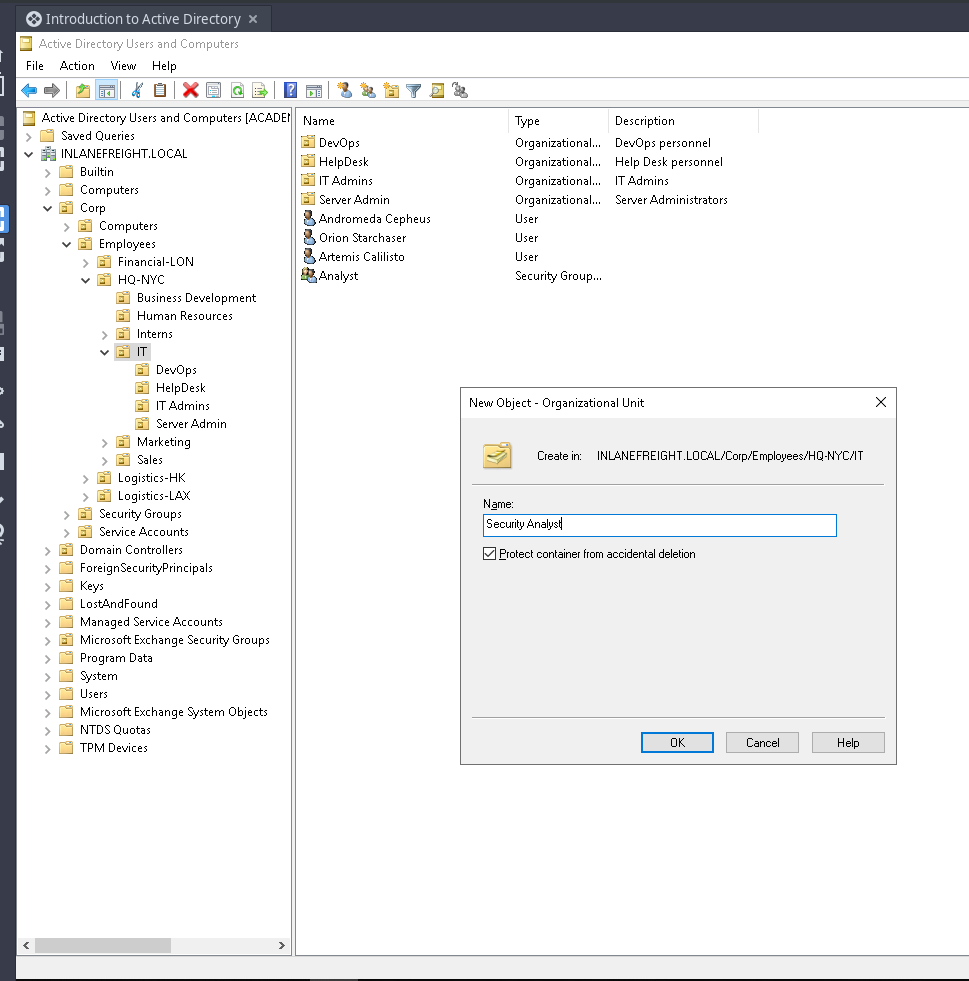
* First we have to create organization unit (OU) named "Security Analyst"

<figure><img src="https://3402520177-files.gitbook.io/~/files/v0/b/gitbook-x-prod.appspot.com/o/spaces%2F6s691pQpzN41rNo5Bip4%2Fuploads%2FFfUZbaXjQUG8xPwtgLwH%2Fimage.png?alt=media&#x26;token=e91ceaa4-fc08-4b2a-aadf-648a4f46da00" alt=""><figcaption></figcaption></figure>

* Now create a group that named "Analyst" which have "Domain Local" group scope and "Security" group type.

<figure><img src="https://3402520177-files.gitbook.io/~/files/v0/b/gitbook-x-prod.appspot.com/o/spaces%2F6s691pQpzN41rNo5Bip4%2Fuploads%2F0mNKGAw2zAngQOiHh7OQ%2Fimage.png?alt=media&#x26;token=5b6895dd-c0c1-473a-b51a-d97b2cae85ae" alt=""><figcaption></figcaption></figure>

* Just add the three newly created users to "Analyst" group

<figure><img src="https://3402520177-files.gitbook.io/~/files/v0/b/gitbook-x-prod.appspot.com/o/spaces%2F6s691pQpzN41rNo5Bip4%2Fuploads%2Fnrqxt1yz2haF49amt9Tf%2Fimage.png?alt=media&#x26;token=229ac40a-101e-43cd-b357-a0fc4ae3e5d0" alt=""><figcaption></figcaption></figure>

***

**Task 3: Manage Group Policy Objects**

* Copy the existing "Login Banner" policy and rename it "Security Analyst Control"

<figure><img src="https://3402520177-files.gitbook.io/~/files/v0/b/gitbook-x-prod.appspot.com/o/spaces%2F6s691pQpzN41rNo5Bip4%2Fuploads%2FObTO7iqZVxF387kHzhkh%2Fimage.png?alt=media&#x26;token=16776774-3b1d-4d55-9bfa-049ecd8f9244" alt=""><figcaption></figcaption></figure>

* Click the edit button to edit the Security Analyst Control GPO

<figure><img src="https://3402520177-files.gitbook.io/~/files/v0/b/gitbook-x-prod.appspot.com/o/spaces%2F6s691pQpzN41rNo5Bip4%2Fuploads%2FoY3IXkKsLL3dv5gIuFhn%2Fimage.png?alt=media&#x26;token=5757c3c2-1593-4b3d-baff-51579e172ecd" alt=""><figcaption></figcaption></figure>

* Just check the policy

<figure><img src="https://3402520177-files.gitbook.io/~/files/v0/b/gitbook-x-prod.appspot.com/o/spaces%2F6s691pQpzN41rNo5Bip4%2Fuploads%2F2bAT9GxuSQ9IAQAOTOPM%2Fimage.png?alt=media&#x26;token=ce770e50-e045-4007-bc22-5325c420925f" alt=""><figcaption></figcaption></figure>

<figure><img src="https://3402520177-files.gitbook.io/~/files/v0/b/gitbook-x-prod.appspot.com/o/spaces%2F6s691pQpzN41rNo5Bip4%2Fuploads%2FOsL35yaZghHGQlqUt2iV%2Fimage.png?alt=media&#x26;token=4520f0e1-89b3-4f35-af82-628bbc1b1878" alt=""><figcaption></figcaption></figure>